Ideally designed for any mix of professional colorists, DPs, or other finishing artists looking to deliver in PQ and HLG, this HDR Toolkit is another SDR-to-HDR conversion tool that could be a solid option to consider for those looking to cover everything needed with their DCTLs.
Billed as a “three-tool” HDR system specifically designed for DaVinci Resolve, this option indeed includes three tools (SDR-to-HDR conversion, peak-nit limiting, and nit-level exposure analysis) that all share a common diagnostic language and can run in real time on the node graph.
Could this be a nice option to consider? Here’s what you need to know.
The HDR Toolkit
As mentioned above, this is another SDR-to-HDR tool that could be a solid choice for those looking to improve their conversion workflows. We’ve covered other options like Beeble’s SwithHDR AI model, but this one seems a bit more robust, offering multiple tools and a ton of features.
The goal of this HDR Toolkit is to cover the moves that every HDR delivery demands, as the tool can help place a finished SDR-grade directly into an HDR container with all of its look intact. The tool can further let users roll their peaks into the deliverable spec without a hard clip, as it can read every pixel in nit before the file leaves the suite.
At the end of your workflows, this HDR Toolkit can place a finished Rec.709 or P3 grade into PQ or HLG and ensure you can keep the look your client signed off on; then you can expand highlights only if the image calls for it.
Price and Availability
Credit: PixelTools
Overall, this is another solid SDR-to-HDR conversion tool with a lot to offer. The company offers a free watermarked demo that includes its SDRtoHDR and PQ Limiter tools, as well as a pretty helpful, complete guide to DCTLs in DaVinci Resolve if you’d like to check that out.
Here’s a full list of specs and features:
- True SDR-to-HDR Container Placement — Rec.709 and P3-D65 masters into PQ or HLG with the approved look intact — and full control over how the top of the image renders.
- Shape Your Highlights — Expand speculars into HDR headroom with an adjustable knee, dialing from hue-faithful to punchy per shot.
- Direct Nit Control — Roll highlights into any peak spec with a shapeable shoulder and hue-preserving limiting, up to 1,000-nit range.
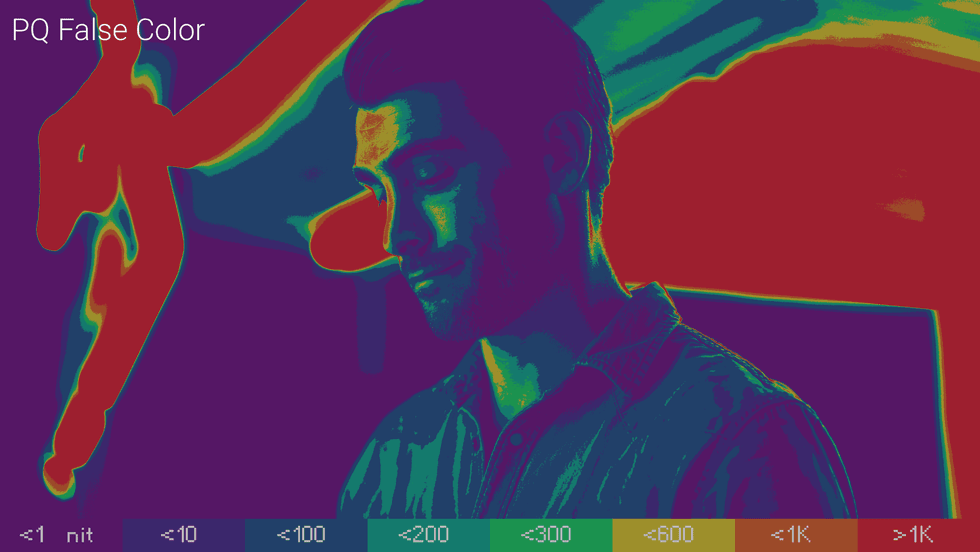
- Two PQ False-Color Schemes — Fine-grained 0–1,000-nit or full-range, with encoded or perceptual nit readings.
- On-Screen Verification Everywhere — Nit-labeled curves, false color, transparency and matte overlays across all three tools.
- Split-View A/B + Legends — Analysis that stays oriented, on landscape or portrait timelines.
- One Diagnostic Language — A consistent false-color palette across the whole toolkit; learn it once, read it everywhere.
- Reference-Safe Overlays — Labels and legends render at BT.2408 graphics white, not eye-searing peak nits.
- Guardrails Built In — On-screen warnings flag invalid configurations before they reach a master; built-in tooltips explain every control.
- PowerGrades Included — Drag-and-drop DRX setups to slot the toolkit straight into your delivery pipeline.
- PixelTools x KaurH — Collaboratively developed.
- No Hassle Licensing — One-Time Payment, No Subscription, Free Updates.
As for pricing, the HDR Toolkit is available as a one-time purchase, which is currently on sale for $160, and you can find it on the company’s website.