
Traditional grading systems tend to organize work around tools. You stack effects, build node graphs, layer LUTs, and route images through increasingly complicated correction structures. Those systems can be powerful, but they also become fragile as you move along in your editorial. Sometimes sequences change, and you have new shots that entirely change a scene’s structure. Temporary grades become permanent by accident, and the structure that initially made sense slowly turns into something difficult to maintain.
Color Mode approaches the problem differently. Instead of organizing grading around effects, it organizes grading around decisions. And those decisions are called Operations.
The Power of Operations
An operation is not just a correction applied to a clip. It is a reusable image decision that understands where it belongs in the sequence and how broadly it should affect the timeline. You can move operations, duplicate them, reorganize them, and apply them across clips, groups, or entire sequences without rebuilding the grade from scratch. Instead of repeatedly fixing individual shots, Operations let you begin defining systems of behavior.
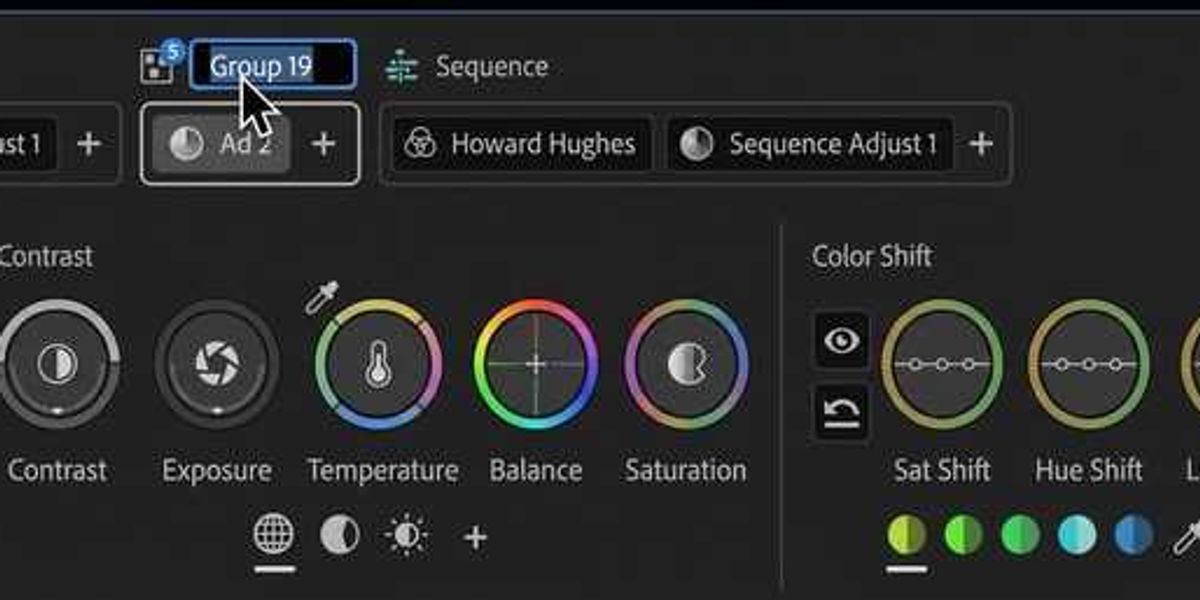
Color Mode separates those behaviors into two Operation types: Adjust and Style. Adjust Operations deal with the technical foundation of the image. Style Operations shape the aesthetic identity of the sequence. Separating those responsibilities turns out to matter a lot once timelines become large, revision-heavy, and structurally unstable.
Adjust Operations
Adjust Operations are the part of the workflow most editors already recognize instinctively. This is where exposure gets balanced, white balance gets corrected, contrast gets stabilized, and shots are normalized so they cut together naturally.
Instead of overwhelming the user with dozens of overlapping grading tools, Adjust Operations focus on the primary corrections that repeatedly determine whether footage feels technically coherent: exposure, tonal balance, contrast, highlight behavior, shadow density, and color temperature.
If every exposure correction behaves differently, then sequence-wide balancing becomes unreliable. If white balance shifts react inconsistently between shots, editors start compensating the clip manually by clip. Over time, those compensations accumulate into grading debt — layers of isolated fixes that become difficult to manage once the sequence changes.
Color Mode tries to reduce that problem by making correction behavior uniform. When an exposure adjustment behaves consistently across footage, you can apply it broadly with confidence. When a camera correction works predictably, you can assign it once to a group and trust it as new shots arrive.
Operations for Sequences, Groups, or Clips
At the sequence level, an Adjust Operation affects the entire timeline. That might mean applying a broad tonal normalization pass, adjusting highlight handling globally, or compensating for a production LUT change late in the process.
At the group level, operations apply only to subsets of footage. For editors, this maps naturally to the way productions are already mentally organized: camera groups, lighting setups, locations, scenes, interview environments, or day/night structures.
A correction for Camera B can live independently from a correction affecting an interior sequence. A scene balancing pass can coexist with a camera-specific compensation without either one overwriting the other.
At the clip level, operations become exceptions.
These are the shots that genuinely need isolated attention: an exposure drift, a difficult insert, mixed lighting contamination, or footage that simply does not conform to the broader correction structure. What’s wonderful about this is that clip-level fixes stop being the default workflow and start to be the exception.
When the system is working correctly, the majority of the sequence inherits behavior automatically from decisions made higher up the hierarchy. That changes the editor’s relationship to grading. Instead of constantly repairing continuity shot by shot, you are building a correction structure that carries continuity forward automatically.
Style Operations
This is where Color Mode separates itself most clearly from LUT-driven workflows.
A LUT is essentially a fixed transform. Once applied, editors often spend the rest of the process compensating around it. Highlights clip incorrectly, skin tones skew unexpectedly, and saturation behaves inconsistently between cameras. The look becomes difficult to adapt because the transformation itself is opaque.
Styles are built differently. Instead of applying a single baked aesthetic, Color Mode constructs looks from modular components. A contrast module might define tonal density and black behavior. A film color module might shape palette response. Another module may influence highlight rolloff, flare behavior, or color separation. The look emerges from the interaction between these modules rather than from one locked transform.
What people often describe as a “film look” is usually a combination of multiple image behaviors happening simultaneously: contrast response, shadow density, color separation, highlight softness, tonal compression, saturation rolloff, and texture behavior. Color Mode exposes those behaviors independently.
Building Looks Instead of Applying Them
The practical value of Color Mode’s modular structure is that it keeps the look open to revision as the sequence changes. You can adjust contrast without rebuilding color response, soften highlights without destroying the rest of the look, and refine saturation behavior independently from tonal shaping. The result is a workflow that behaves much more like editorial iteration, where you are no longer committing to a single irreversible transform early in the process and can continue evolving the look as the sequence evolves.
That flexibility becomes especially important during modern finishing workflows, where editorial rarely stabilizes cleanly. Directors continue adjusting scenes while additional photography arrives late. VFX shots appear incrementally, and entire tonal directions may shift after test screenings. A rigid grading structure tends to fracture under those conditions.
A modular Style system remains adaptable. You can begin with a preset look, modify the underlying modules, build a new configuration from scratch, and save that result as a reusable Style. A show look can evolve gradually instead of requiring destructive resets.
A Style can exist across the entire sequence, defining broad creative intent. It can exist at the group level, affecting only a specific scene or visual context. Or it can exist at the clip level, allowing a shot to diverge slightly while preserving the underlying aesthetic system.
Why Separating Adjust and Style Matters
That separation between Adjust and Style operations is one of the most structurally important aspects of Color Mode. Technical corrections remain independent from creative look development. That means you can continue evolving the look without destabilizing your balancing work underneath it.
Most sequences today are not stable enough for fragile grading systems. Editors are constantly working inside partially finished images. Camera LUTs, temporary grades, HDR transforms, remote review workflows, online finishing constraints, and compressed delivery schedules have collapsed the separation between editorial and grading.
Color decisions increasingly happen while the cut is still evolving. Color Mode is designed around that reality. The system works best when the structure stays simple: broad technical decisions at the sequence level, shared corrections at the group level, and minimal exceptions at the clip level. Style operations, then layer creative direction on top without interfering with the technical foundation.
Once that structure is in place, the workflow begins behaving less like a series of isolated shot repairs and more like a coherent visual system, where new shots integrate faster, corrections propagate automatically across the sequence, scene continuity remains stable, and look revisions become manageable rather than destructive.
That is ultimately the larger shift Color Mode is attempting to make. It reframes grading from a collection of disconnected clip corrections into a hierarchy of reusable editorial decisions — technical decisions, creative decisions, and propagation decisions that remain flexible even as the sequence continues changing underneath them.
This is article number six in a series on Color Mode in Premiere. If you missed any of the previous articles, start with Why Adobe Built Color Mode. In the next article, we’ll shift to The Divide and Conquer Grading Workflow, which covers how fast a full sequence grade can actually be and why this approach changes how people think about color work.