
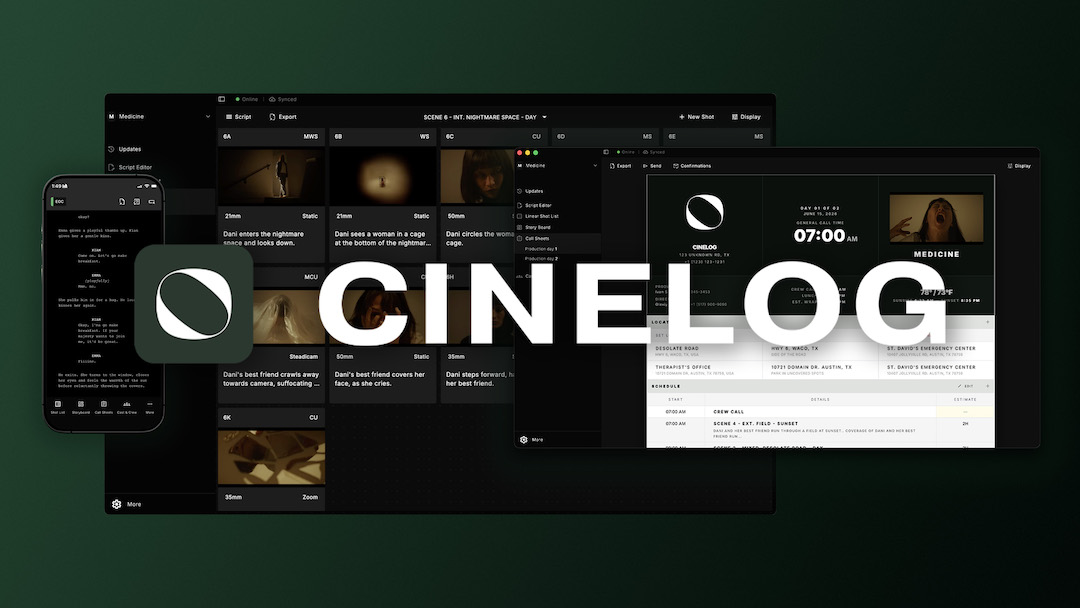
CineLog is a film pre-production tool that keeps the script, breakdown, shot list, storyboards, shooting schedule, and call sheets in one project, on every device the crew carries. It’s the newest name in a category that has mostly been built around per-seat pricing and apps that only run in a browser. We built it around a different idea: pre-pro should follow the crew onto set and be in their pocket.
I co-founded CineLog with a software architect, and we built it while I was making my feature film debut, Each Other’s Country, because I was tired of doing pre-pro in five different places.
The current problem with pre-production software: planning falls apart between documents
On most productions I’ve worked on, documents live in several places. The script is in one program, the breakdown is in another. The shot list is in a spreadsheet, and so is the call sheet. But they have to be rebuilt on every production, and none of them talk to each other.
Every change becomes manual work. A new draft comes in, and somebody redoes the breakdown. A scene moves to another day, and somebody retypes the call sheet. A shot gets cut, but it’s still on the list the DP is reading. Small crews feel this the most, because the person making the plan is usually the person running the day.
The plan is essentially like a relay baton. The script hands it to the breakdown, the breakdown hands it to the shot list and the schedule, and the schedule hands it to the call sheet. And the baton only gets dropped at the handoffs.
Two more problems make it worse. The first one is access. When a tool only runs in a browser, a location with one bar of signal turns the plan into a PDF from the night before, and a PDF doesn’t update. The second one is cost. When pricing is per seat, a big crew becomes a long list of subscriptions, and people start sharing one login.
What’s different about CineLog
There are three things CineLog does differently, and those are the chain, the crew, and the math.
The chain is the relay without the dropped baton. You enter something once, and it shows up wherever it’s needed. So let’s say scene 12 is a kitchen scene with four setups, and it has to move from day two to day four. You drag the strip once, and the shot list and the call sheet move with it.
The crew is part of the plan. One subscription unlocks CineLog on iOS, Android, macOS, and Windows, and in the browser. The project lives on the device, so it keeps working offline, and your changes sync when the connection comes back. And the people you invite don’t need a paid seat. They create a free account, and they get view or edit access based on what you give them.
The math follows. As of September 2026, a 25-person crew on CineLog’s Production Company plan costs $40 a month, with everybody on the project. The same crew on two popular per-seat tools comes to $149 and $155 a month, and that’s only paying for the six people who actually change the plan. There’s also a free plan with one project, the core tools, offline mode, and two collaborators, so you can try it on a real project before you pay.
The five tools in action
Script editor
Everything starts with the script. Say a new draft lands, and a scene now has a coffee mug that wasn’t there before. In the script editor, the new draft shows up as a scene-by-scene comparison against the one you have, so you see the change, tag the mug as a prop, and the breakdown and the shot list stay intact. Cast, props, wardrobe, makeup, and hair all get tagged the same way and roll up into one breakdown list.
Shot list

Next is the shot list. Let’s say a scene has four setups, and each one carries its lens, shot type, camera movement, equipment, blocking notes, and an estimated time. The estimated time is the part that matters, because it carries into the schedule. Four setups at 20 minutes each is an hour and twenty minutes on the board, so the length of the day comes from the coverage you actually planned.
Storyboards

Let’s say that I want to visualize a complex oner before we shoot it on the day. Storyboards attach directly to the shots they show, with a linear view for the sequence in order and a grid view for the whole thing at a glance. If I decide to move my oner to the back of the scene, I move the frame to the back, and the DP’s shot list is already in the new order.
Shooting schedule

The shooting schedule is a stripboard, one strip per scene, with the set, the cast, and the time estimate from the shot list. Remember the baton? This is where a lot of small productions drop it, because the board gets rebuilt over and over in the last week of prep. Let’s say I move a scene from day two to day four. All I have to do is drag the strip once, and the call sheets for both days update.
Call sheets

And finally, the call sheet. It starts with the day’s scenes and cast already filled in from the schedule. You set the crew call, and the scene gets its start time from the estimates above it. Then you send it once, and you see delivered, opened, and confirmed next to every name before you leave for set.
Who is it for, and not
CineLog is built for scripted productions of about two to twenty shoot days, where several people need to change the plan, and the crew is spread across phones, tablets, and laptops. That’s features, short films, and commercial shoots with a real script.
It focuses on the path from the page to the set, and that focus is on purpose. It isn’t a budgeting tool, so a production that needs full accounting will still run separate software for that.
If your plan right now is a script file, a spreadsheet, and a pile of PDFs, here’s a quick exercise. Put one real project on the free plan at CineLog. Invite the two people who change it the most. Then move one scene to another day and see which of the five documents stops going out of date first.
Olexiy Kryvych is a Ukrainian-born film director, writer, and actor based in Austin, Texas, and a co-founder of Cinelog. “Each Other’s Country” is a contained thriller feature he wrote and directed in May 2026.
Related